How to choose five hashtags for a photo
For years the advice was to use all thirty. Since Instagram capped posts at five, the job is the opposite: not collecting tags but choosing a few that say what's in the picture. Here's how I do it, with three photos worked through tag by tag.
What changed
In December 2025 Instagram announced that posts and Reels would be capped at five hashtags (Social Media Today has the announcement). Adam Mosseri's line was that a few specific tags do better than a long list of generic ones.
I make an app that suggests hashtags, so this one landed on my desk directly. Its results screen still has a note saying Instagram allows thirty per post — that's on my list for the next update. The old routine of pasting thirty tags and hoping a few of them work is simply gone. With five slots, every #love is a slot you didn't spend on saying what's actually in the picture.
How I pick the five now
- Name the thing in the photo. Literally: the dish, the dog, the lake. That's tag one nearly every time.
- Then go one step narrower. #avocadotoast rather than #food, #goldenretriever rather than #dog. A narrow tag says what the photo is. A broad one says almost nothing.
- Add the place, but only if someone might look for it. A city, #coffeeshop, a season. If nobody would search for it, skip it.
- Keep one slot for the people who post this kind of picture. #dogsofinstagram is a cliché, and it's also a real community.
- Open every tag before you use it. Look at the top posts. If they look like yours, keep it. If it's spam, something unrelated or nearly empty, drop it. It takes a minute.
- If it isn't in the photo, it doesn't go in. That rules out #instagood and #photooftheday, and also the wishful ones — #healthy under a plate of fries.
Example 1: breakfast in a café
This is one of the illustrations from InTager's App Store page.

- #avocadotoast — the main subject, and as specific as it gets
- #brunch — what the meal is
- #latteart — the other thing in the frame that people look for
- #breakfastideas — why someone would save a photo like this
- #coffeeshop — the setting — swap it for your city's café tag if there is one
- #food, #foodie — too broad to say what the photo is
- #healthy — an opinion about the meal, not a description of it
- #instagood, #photooftheday — they describe nothing
- #eggs — true, but #avocadotoast already says it
Example 2: a mountain lake at sunrise
Landscape photos are where people reach for #travel and #nature by reflex. Resist it.

- #mountainlake — the subject, in two words
- #sunrise — half of this photo is the light
- #reflection — what makes it different from every other lake photo
- #hikingadventures — the people who post and save shots like this
- #[place name] — replace with the real park or place if you know it; skip it if you don't
- #travel, #nature — too broad to describe this photo
- #wanderlust — a mood, not a description
- #landscape — fine as a swap, but #mountainlake is more specific
- #travelgram — says nothing about this picture
Example 3: a dog in the park
The easiest one to get wrong, because every dog photo invites #cute.
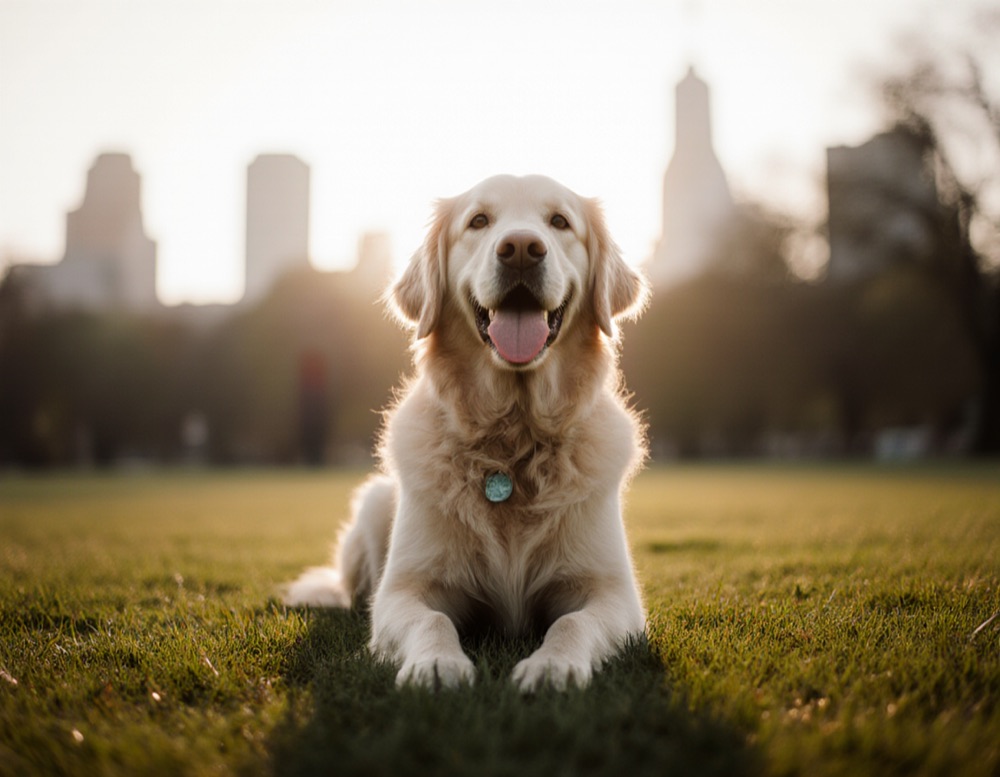
- #goldenretriever — the breed, more useful than #dog
- #dogsofinstagram — the community tag, still worth one slot
- #goldenhour — the light in the photo
- #dogpark — the setting
- #happydog — the expression, which is the whole point of the picture
- #dog, #pets — too broad
- #cute — that's how you feel about it, not what it shows
- #puppy — he's clearly a grown dog — a wrong tag is worse than no tag
- #citylife — the city is a blur in the background, not the subject
What about other apps?
I've only written about Instagram because that's where the number changed. Elsewhere, check the app's own rules for how many tags it takes. The habit carries over anyway: describe the photo. And no choice of hashtags guarantees reach, whatever anyone promises.
If you'd rather not do it by hand
InTager is my iPhone and iPad app. You pick a photo, it looks at what's in it and writes a few captions in different tones, plus a list of hashtags for that photo. For now you still choose the five yourself from the list — the method above is how I'd do it.
Captions come in 17 languages. Ten generations are free and there's no account; after that there are one-time packs, no subscription.
iPhone and iPad · ten generations free · no account · no subscription
Questions
How many hashtags can I use on Instagram now?
Since Instagram's announcement in December 2025, a post or Reel can carry up to five hashtags.
Should I put hashtags in the caption or in the first comment?
Instagram describes the limit per post, so we would not count on a comment as a way around it.
Are broad hashtags like #love still worth using?
They say little about the photo. With five slots, tags that accurately describe what is in the picture are a better use of each one. No choice of hashtags guarantees reach.
How do I know if a hashtag is good?
Open it and look at the top posts. If they look like your photo, the tag fits. If they are unrelated, spammy or empty, choose another.
Can an app pick the hashtags for my photo?
InTager is an iPhone and iPad app that looks at your photo and suggests captions and a list of hashtags for what is in it; you choose the five that fit. Ten generations are free and no account is needed.
More caption guides
- Christmas captions and hashtagsTree, lights, family dinner, gifts, pets and snow — captions and tag sets for each.
- New Year's Eve captionsFireworks, the countdown, the party and the quiet morning after.
- Captions for cafés and coffee shopsEveryday posts for a café: the menu, latte art, the room, the team and opening hours.
- Captions for handmade sellersProduct shots, the making of it, new drops, packing orders and markets.
- Halloween captions and hashtagsCostumes, pumpkins, parties, decor, pets and treats.